
 Game systems
This guide comes from the old wiki and is being reviewed; some details may be out of date. The Codex always shows the current game data.
Homunculus Basics
The maximum level of all Homunculi is capped at level 150.
To create your Homunculus, you need an embryo crafted with the alchemist's skill "Pharmacy". You may need several of them to get the specific Homunculus you want, as the base Homunculus you get is random. You can purchase the materials needed in the Alchemist Guild, located in the south-west corner of Aldebaran.
With Embryos in your Inventory, use the alchemist's skill "Call Homunculus". An Embryo is consumed as a catalyst and a newly formed Homunculus appears near you. You can use Alt + R to view your Homunculus Info window, and use the command "@hominfo" to view detailed Homunculus stats and Intimacy points.
If you did not get the Homunculus you want, you can delete it permanently by clicking the "del" button on the Homunculus Info window and try your luck again. Each newly formed Homunculus has an evolved form, which differs only in appearance and an additional ultimate skill; the evolution also increases its statistics.
After you are satisfied with your choice, you can resummon your Homunculus with the "Call Homunculus" skill, make it rest with "Rest", or use the "Resurrect Homunculus" skill if it died.
As soon as you have created your Homunculus, if you want it to follow your orders correctly, type /hoai in the chat box, then type @refresh. If it does not work as expected, see the Azzy AI Tutorial section of this guide.
How do I raise my Homunculus?
You have to increase its Intimacy by feeding it (between 11 and 81 hunger). Do not let it starve (letting its hunger reach 10 or less), but do not overfeed it either (feeding when its hunger is at 81 or more) or it will lose intimacy; see the table below. Homunculus food items can be bought from the Trader NPC inside the Geffen Tool Shop, or from any Pet Groomer NPC.
There is also an autofeed option that can be enabled with Alt+R. It feeds your Homunculus whenever its hunger drops low enough, which makes it an efficient and easy way to go about it. You can leave it always on, without any drawback, as long as you have the correct food item in your inventory.
| Hunger | Intimacy impact |
|---|---|
| 1 ~ 10 | + 2 |
| 11 ~ 25 | + 4 |
| 26 ~ 75 | + 3 |
| 76 ~ 90 | - 0.2 |
| 91 ~ 100 | - 2 |
Its Intimacy status changes depending on how many Intimacy points it has:
| Intimacy amount | Status |
|---|---|
| 1 ~ 3 | Hate with Passion |
| 4 ~ 10 | Hate |
| 11 ~ 100 | Awkward |
| 101 ~ 250 | Shy |
| 251 ~ 750 | Neutral |
| 751 ~ 910 | Cordial |
| 911 ~ 1000 | Loyal |
Whenever it reaches Loyal status, you can evolve it by using a "Stone of Sage".
- You can get one as a drop from monsters.
- The evolved form has higher Max HP, SP and stats.
Which Homunculus is the best?
The best Homunculus depends on what you want to do with it, and on whether its characteristics suit your style.
Note: on DARO, all Homunculi have access to the skills of the other Homunculi, but you can only learn them up to level 3.
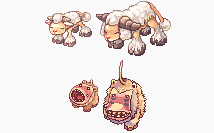 Amistr Amistr | Characteristics | |||
|---|---|---|---|---|
| Type | Tank | Race | Brute | |
| Amistr has high HP pool, Defense, and decent Attack. Tends to have low INT, SP pool, and low SP regen. Its loyal skill "Blood Lust" temporarily boosts its physical attack damage. Amistr's Castling is also useful to get yourself out of dangerous situations. All-round good Homunculus base for general purpose. | ||||
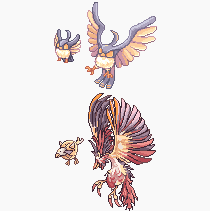 Filir Filir | Characteristics | |||
| Type | ASPD Dealer | Race | Brute | |
| Filir has decent Attack and Attack Speed. Tends to have moderate HP pool and low SP pool. Filir has a melee attack skill "Moonlight" that is instacast. Its loyal skill (S.B.R. 44) deals damage according to its Intimacy, and reduces Intimacy after usage. | ||||
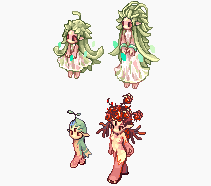 Lif Lif | Characteristics | |||
| Type | Support | Race | Demi-Human | |
| Lif has decent Magic Attack and SP pool. Tends to have low Attack, Defense, Attack Speed, and HP pool. Lif has recovery and movement speed buff skills "Healing Hands" and "Emergency Avoid" that can help you survive to difficult situations. | ||||
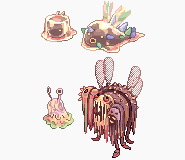 Vanilmirth Vanilmirth | Characteristics | |||
| Type | Mage & Brewers | Race | Formless | |
| Mandatory Homunculus for brewers, as Vanilmirth's "Instruction Change" improves Pharmacy success rates. Well-rounded stats and stat growth, and is also a good Homunculus base for general purpose. Vanilmirth has a magic attack casting skill "Caprice", that can now be casted lvl 5. Its loyal skill (Self Destruction) deals damage according to its MaxHP, and reduces Intimacy after it is used. | ||||
Azzy AI Tutorial
Homunculus behavior can be controlled using the Azzy AI application, which is included in DARO's Full Installer. If, for some reason you do not have it in your DARO folder, you can download an AI with default settings by clicking here and extracting the file to your DARO installation folder, overwriting all.
If the settings of the base AI doesn't please you, you can modify the behavior of your Homunculus thanks to this program.
In order to do that, in the "AI" folder, click "USER_AI" folder and find the "AzzyAIConfig.exe" application and run it. It will grants you permissions to change the settings of the program.
If your Homunculus does not behave the way you configured it, check the following so that all settings are applied correctly:
- If you are already logged in, log out of your character and come back in game.
- While in game, make sure the AI is set to "Customized". You can change it by typing /hoai, followed by @refresh.
- Make sure your Homunculus is not in passive mode. You can alternate between "Passive" and "Aggressive" mode with the shortcut Alt+T.
Homunculus Tab
The Homunculus tab is where more detailed configuration for Homunculus can be found. This is where you configure how and when your Homunculus uses its skills, how it moves around relative to its owner and enemies, and so forth. There are several options, including:
Basic options
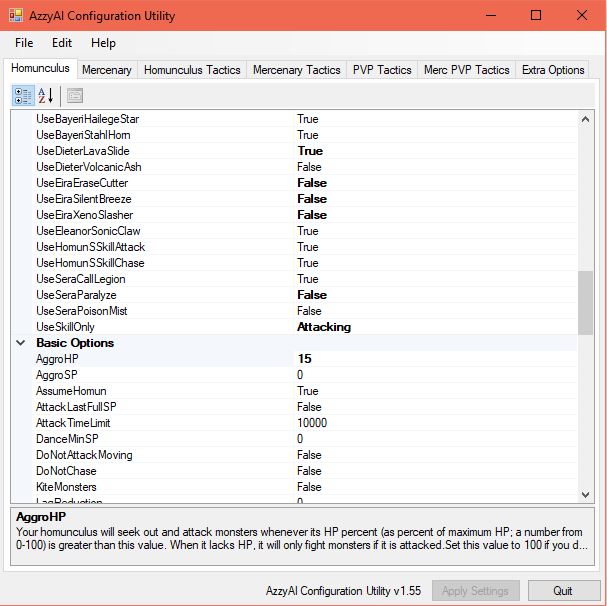
These are the basic configurations of the Homunculus, where you determine when it should aggro, whether it should use skills or not, how many monsters it should tank before it does something else (such as use an AoE skill), and so forth. Pay attention to the Old Homun Type option and be sure to set it to the Homunculus you are currently using, to prevent odd behavior and to ensure your Homunculus uses its skills. Whether your Homunculus has learned its attack skill or not, generally it's better to set Use Attack Skill to True. If you feel like your Homunculus is attacking too slowly, set Use Dance Attack to True. Otherwise, set it to False so that your Homunculus would stand in one spot while attacking, thus allowing it to regenerate SP easier.
Autobuff options
This is where you control when and how your Homunculus uses its buff/supportive, defensive and recovery skills, including:
- Amistr's "Defense", "Castling", and "Blood Lust"
- Filir's "Over Speed" and "Fleet Move"
- Lif's "Mental Change", "Emergency Avoid" and "Healing Hands"
- Vanilmirth's "Chaotic Benedictions"
Autoskill options
This is where you configure how and when your Homunculus uses its attack/offensive skills.
Standby Options and Walk/Follow Options
Here you can configure how your Homunculus moves around relative to you and to enemies. You can also determine whether your Homunculus sits with you when you sit, or have it patrol around you instead.
Homunculus Tactics Tab
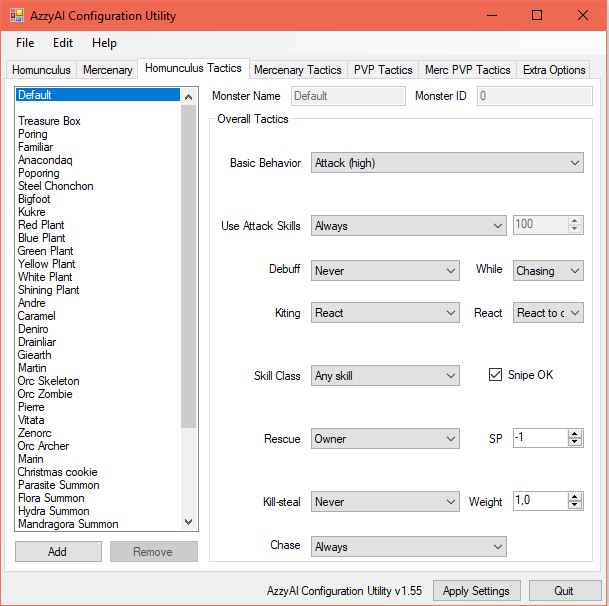
This is what the Homunculus Tactics tab looks like when you open it.
This is where you configure what your Homunculus should do when it encounters monsters in the game. Generally it's best to set Basic Behavior to Attack (Medium) or Attack (High) so that your Homunculus will aggro on all the monsters within its sight.
To configure how your Homunculus uses its attack skills, click the dropdown lists on Use Attack Skills and Skill Class. Some Homunculus skills such as Caprice and Moonlight may have a long cooldown/reuse delay when the Homunculus autocasts them.